Connect Delft-FEWS
FlowAi serves its observations and forecasts in the format Delft-FEWS imports natively, so your FEWS can read them like any other PI service: no scripts, no file transfers. This guide takes a FEWS administrator from an API key to FlowAi series in a FEWS plot.
What you need
- A FlowAi Commercial organisation with the Data Integration package, and an admin of it.
- A Delft-FEWS configuration with the PI Webservice Import (
importType pi_server). It was tested with Delft-FEWS 2023.02. - Your WSC stations already defined as locations in FEWS (most Canadian configurations have them).
- Outbound HTTPS from the FEWS import machine to
api.flowai-forecast.com.
1. Create an API key
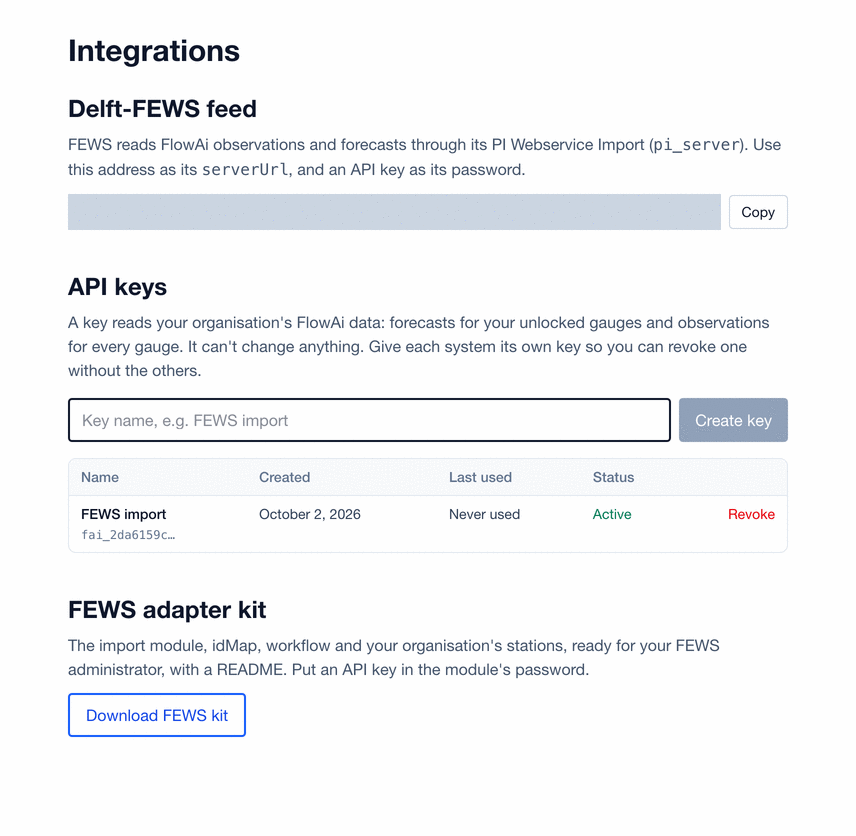
In Profile › Integrations, name the key (for example “FEWS import”) and choose Create key. Copy it straight away: FlowAi stores only a fingerprint of it and shows it once. The page also shows your feed address, https://api.flowai-forecast.com/rest/fewspiservice/v1/.
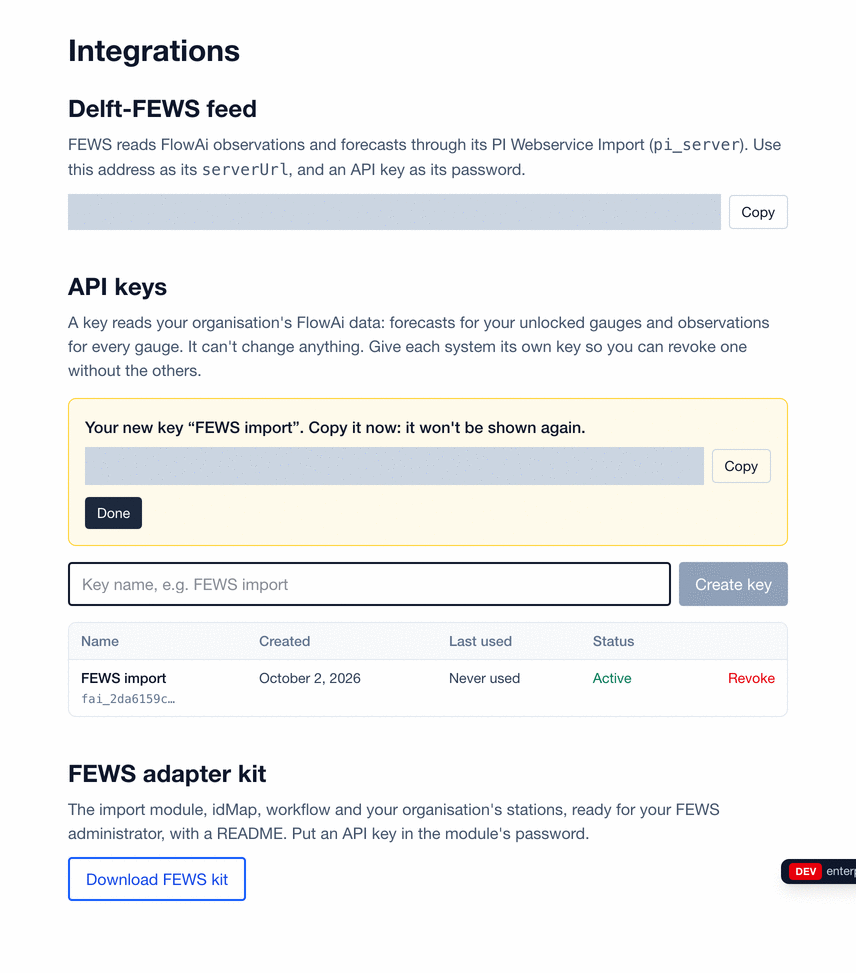
A key reads what your organisation's members read: forecasts for your unlocked gauges and observations on any gauge. It can't change anything. Give each system its own key, so one can be revoked without stopping the others.
2. Download the FEWS kit
Download FEWS kit on the same page gives a zip of ready-made configuration for your organisation:
ModuleConfigFiles/Import/ImportFlowAi.xml: the import module.IdMapFiles/IdImportFlowAi.xml: maps FlowAi's parameter ids to yours.WorkflowFiles/Import/ImportFlowAi.xml: the workflow that runs it.LocationSets-snippet.xml: a location set of your unlocked stations, by WSC id;FlowAiLocations.csvhas their names and positions in case one is missing from your configuration.Registrations-snippet.xmland aREADME.md.
3. Install the kit
- Copy the three XML files into the same folders of your configuration.
- Paste the location set into
RegionConfigFiles/LocationSets.xml, and each registration into its file: the module instance and workflow descriptors next to the existing ones (before anyrootNode), the node inside a group inTopology.xml, or schedule the workflow in the Master Controller. - Put your API key in
<password>. Once it works, replace it with<encryptedPassword>(F12 › clipboard utilities in a FEWS client). - In the idMap, set each
internalto your own parameter id, and drop the time series sets you don't need.
<timeSeriesImportRun xmlns="http://www.wldelft.nl/fews" ...>
  <import>
    <general>
      <importType>pi_server</importType>
      <serverUrl>https://api.flowai-forecast.com/rest/fewspiservice/v1/</serverUrl>
      <user>flowai</user>
      <password>PASTE-YOUR-FLOWAI-API-KEY</password>
      <relativeViewPeriod unit="day" start="-3" end="10" startOverrulable="true" endOverrulable="false"/>
      <idMapId>IdImportFlowAi</idMapId>
      <dataFeedId>FlowAi</dataFeedId>
    </general>
    <timeSeriesSet>
      <moduleInstanceId>ImportFlowAi</moduleInstanceId>
      <valueType>scalar</valueType>
      <parameterId>Q.fcst.day</parameterId>
      <locationSetId>FlowAiLocations</locationSetId>
      <timeSeriesType>external forecasting</timeSeriesType>
      <timeStep unit="day"/>
      <readWriteMode>add originals</readWriteMode>
    </timeSeriesSet>
    <!-- ... one timeSeriesSet for each parameter -->
  </import>
</timeSeriesImportRun>
<idMap version="1.1" xmlns="http://www.wldelft.nl/fews" ...>
<parameter internal="QR.obs" external="Q.obs"/>
<parameter internal="HG.obs" external="H.obs"/>
<parameter internal="QR.sim" external="Q.fcst.day"/>
<enableOneToOneMapping/> <!-- station ids are WSC ids on both sides -->
</idMap>FEWS sends the user and password only after the feed asks for them: its first request gets a 401 with a Basic challenge, the second carries the key. That's why <user> can be anything.
4. Run the import
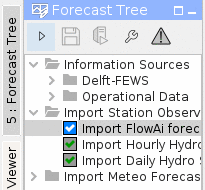
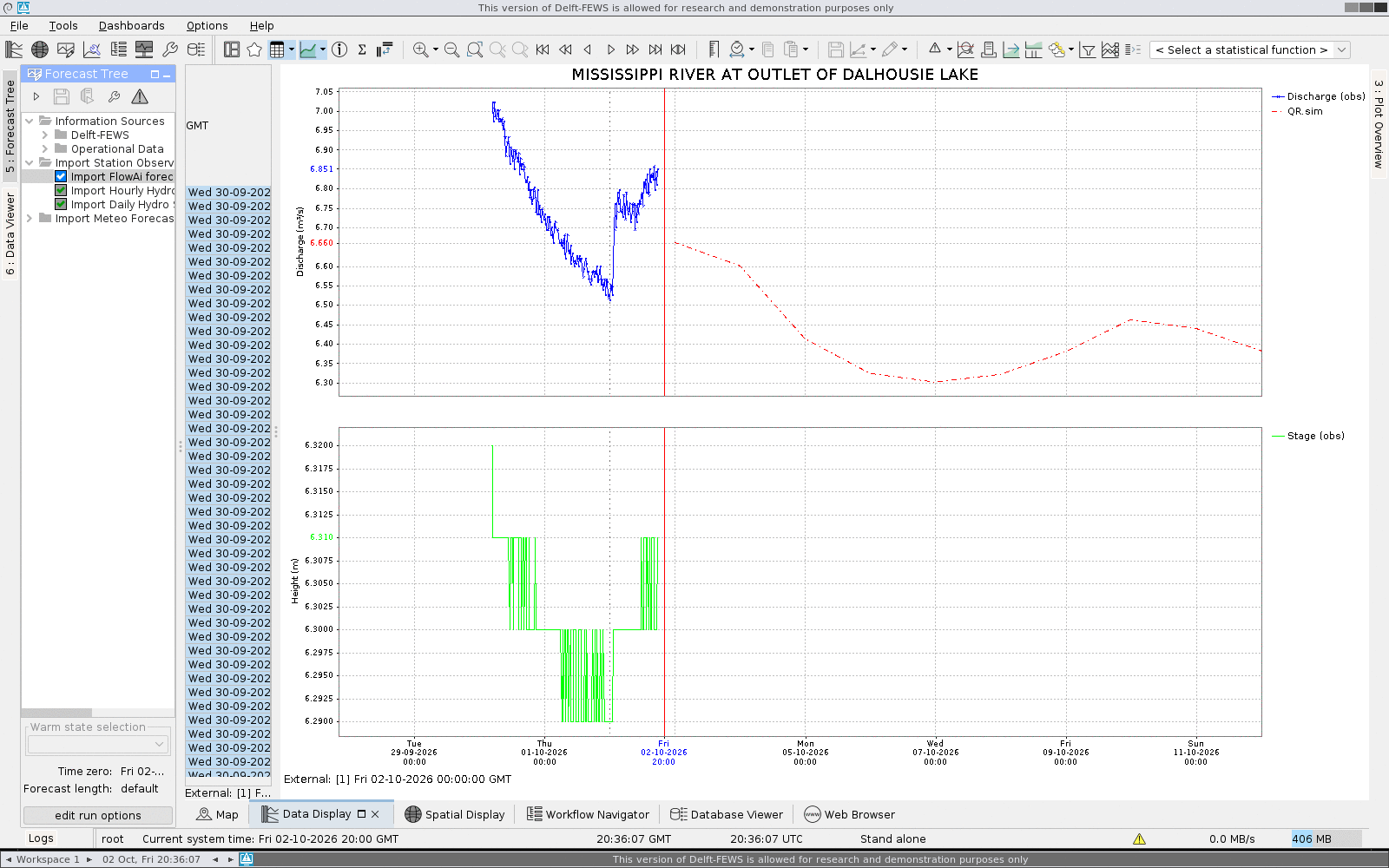
Run the Import FlowAi forecasts workflow from the forecast tree, or let the Master Controller run it. Hourly is plenty: forecasts are issued daily and real-time readings arrive every 5 to 15 minutes. The log says how many series it wrote; a Config.Error there points at the file to fix.
Each day's forecast has a published target issue time, a target and not a guarantee. The forecast status pagegives it in UTC and your time zone, and whether each of the last 90 days met it. The kit's README states it too.
Reading the values
| Parameter id | What it is | FEWS type | Units |
|---|---|---|---|
Q.obs | Observed discharge: the provider's real-time readings, about the last three days, at their own times | instantaneous | m³/s |
H.obs | Observed water level (stage): the provider's real-time readings, at their own times | instantaneous | m |
Q.obs.day | Observed daily mean flow, as far back as your plan's observed history. At a reservoir it is the dam's release (or, behind a natural flow, the station's measured flow), never its natural or total inflow | mean, daily | m³/s |
H.obs.day | Observed daily mean water level | mean, daily | m |
QIN.obs.day | Observed daily natural inflow: a reservoir's computed natural inflow, or a computed natural flow; no values elsewhere | mean, daily | m³/s |
QINT.obs.day | Observed daily total inflow of a reservoir, including releases from upstream dams; no values elsewhere | mean, daily | m³/s |
Q.fcst.day | FlowAi's daily mean flow forecast from the latest issue, forecastDate = the issue time | mean, daily | m³/s |
QIN.fcst.day | The same, for a gauge whose forecast is of its natural inflow (daily only) | mean, daily | m³/s |
QINT.fcst.day | The same, for a gauge whose forecast is of its total inflow (daily only) | mean, daily | m³/s |
Q.fcst.6h | The same issue's 6-hour mean discharge forecast, four values a day (your plan's horizon on your unlocked gauges) | mean, 6-hourly | m³/s |
H.fcst.day | The same issue's daily mean forecast as a water level, in metres above the gauge datum: each flow through the station's rating curve. Only for a gauge with a published rating, and none while ice withholds it | mean, daily | m |
H.fcst.6h | The 6-hour mean level forecast: each 6-hour mean flow through the same rating curve (your plan's horizon on your unlocked gauges) | mean, 6-hourly | m |
- Times are UTC (
timeZone 0.0). Real-time readings keep their own time stamps. - Daily values are stamped at the end of their day. A daily mean for day D is a FEWS
meanvalue at D+1 00:00 (a mean covers the period before its time stamp). FlowAi's daily values follow the data provider's calendar day (for Ontario's provider, 05:00 to 05:00 UTC; a Water Survey of Canada station outside Ontario uses its province's local standard-time day, with no daylight time, as HYDAT does: 04:00 to 04:00 UTC for Nova Scotia), and FlowAi does not shift them to UTC days. Each daily series says so in itslongName. - 6-hour values (
Q.fcst.6h) are means over exact UTC blocks (00–06, 06–12, 12–18, 18–24), each stamped at its block's end. A day's four values average to that day's daily forecast. Where an issue has no 6-hour values, or the gauge isn't unlocked, the series is empty; nothing is made up from the daily forecast. - Level forecast (
H.fcst.day,H.fcst.6h) is the forecast flow carried through the station's stage-discharge rating, in metres above the gauge datum. A gauge without a published rating has an empty series. Each series'commentgives the rating error (RMSE) and, where the Water Survey of Canada publishes one, the offset to a geodetic datum. A level beyond the range the rating was fitted on carries flag3(doubtful). Daily values are daily means; the highest level of a day can be higher. - The forecast is the latest issue, with
forecastDateset to its issue time. Your unlocked gauges get your plan's 10-day horizon; other gauges get no forecast (the Free level). - Flags:
0is an original reliable value;3(doubtful) marks a value FlowAi's quality control flagged. - Gaps stay gaps. A value that doesn't exist is not sent, never filled in, so FEWS shows the gap.
The feed format
The feed is the part of the FEWS PI REST service the PI Webservice Import uses: one request per run, for the stations and parameters it imports. You don't need to build these requests yourself; FEWS does. They're here so you can test the feed, or read it from another system.
GET /rest/fewspiservice/v1/timeseries?convertDatum=false&useDisplayUnits=false
&startTime=2026-09-29T20:00:00Z&endTime=2026-10-12T20:00:00Z
¶meterIds=Q.obs¶meterIds=Q.fcst.day
&filterId=flowai&locationIds=02KF019HTTP/1.1 401 Unauthorized
WWW-Authenticate: Basic realm="FlowAi"
{"detail": "api_key_required", "status_code": 401}HTTP/1.1 200 OK
Content-Type: application/xml
X-FlowAi-Disclaimer: https://flowai-forecast.com/disclaimer; version=2026-10-10
<TimeSeries xmlns="http://www.wldelft.nl/fews/PI" version="1.24">
<timeZone>0.0</timeZone>
<series>
<header>
<type>instantaneous</type>
<moduleInstanceId>FlowAi</moduleInstanceId>
<locationId>02KF019</locationId>
<parameterId>Q.obs</parameterId>
<timeStep unit="nonequidistant"/>
<startDate date="2026-10-01" time="00:00:00"/>
<endDate date="2026-10-02" time="17:30:00"/>
<missVal>NaN</missVal>
<longName>Observed discharge, provider real-time readings (UTC time stamps)</longName>
<stationName>Mississippi River at Outlet of Dalhousie</stationName>
<units>m3/s</units>
</header>
<event date="2026-10-01" time="00:00:00" value="6.735" flag="0"/>
<event date="2026-10-01" time="00:15:00" value="6.728" flag="0"/>
<!-- ... -->
<event date="2026-10-02" time="17:30:00" value="6.851" flag="0"/>
<comment>Forecasts are for information only and may be inaccurate. FlowAi is not responsible for the consequences of inaccurate forecasts. Not for life-safety decisions. Follow official flood messages from the flood forecasting or emergency management authority for your area (such as your conservation authority, municipality or provincial government). Data Source: Environment and Climate Change Canada (...). Contains information provided by the Ontario Surface Water Monitoring Centre, Ministry of Natural Resources.</comment>
</series>
<series>
<header>
<type>mean</type>
<locationId>02KF019</locationId>
<parameterId>Q.fcst.day</parameterId>
<timeStep unit="day" multiplier="1"/>
<startDate date="2026-10-03" time="00:00:00"/>
<endDate date="2026-10-12" time="00:00:00"/>
<forecastDate date="2026-10-02" time="00:00:00"/>
<units>m3/s</units>
<!-- ... -->
</header>
<event date="2026-10-03" time="00:00:00" value="6.660457" flag="0"/>
<event date="2026-10-04" time="00:00:00" value="6.601323" flag="0"/>
<!-- ... -->
<event date="2026-10-12" time="00:00:00" value="6.381788" flag="0"/>
</series>
</TimeSeries>PI-XML is the default. Add documentFormat=PI_JSON (or send Accept: application/json) for PI-JSON:
{
  "version": "1.24",
  "timeZone": "0.0",
  "timeSeries": [
    {
      "header": {
        "type": "mean",
        "locationId": "02KF019",
        "parameterId": "Q.fcst.day",
        "timeStep": { "unit": "day", "multiplier": "1" },
        "forecastDate": { "date": "2026-10-02", "time": "00:00:00" },
        "units": "m3/s"
      },
      "events": [
        { "date": "2026-10-03", "time": "00:00:00", "value": "6.660457", "flag": "0" },
        { "date": "2026-10-04", "time": "00:00:00", "value": "6.601323", "flag": "0" }
      ]
    }
  ]
}
To try the feed from a terminal:
curl -u "fews:YOUR-API-KEY" \
"https://api.flowai-forecast.com/rest/fewspiservice/v1/timeseries?locationIds=02KF019¶meterIds=Q.obs¶meterIds=Q.fcst.day&startTime=2026-09-29T00:00:00Z&endTime=2026-10-12T00:00:00Z"Every response carries the forecast disclaimer: its link and version in the X-FlowAi-Disclaimer header, and its short text in each series' comment. A Public Agency's key gets the Public Agency version. After the disclaimer, the comment carries the credits of the series' data: the station's data providers, and for a forecast also the weather data behind it. Keep them with the values wherever you show or pass them on (the full list is on Data Sources).
Troubleshooting
| Status | Code | What it means |
|---|---|---|
| 401 | api_key_required | No key was sent. FEWS always gets this first: it is the challenge that makes FEWS send its user and password. Nothing to fix. |
| 401 | invalid_api_key | The key is wrong, incomplete or revoked. Check the password in the import module, or create a new key. |
| 403 | integration_required | Your organisation does not hold the Data Integration package (or it has ended). The feed and keys stop at once. |
| 429 | api_key_rate_limited | More than 60 requests a minute or 10,000 a day on this key. Wait for the time in Retry-After. An hourly import is far below the limit. |
| 400 | unknown_location_ids | A station id FlowAi doesn't carry (the response lists them). Check the location set and idMap. |
| 400 | unknown_parameter_ids | A parameter id that isn't one of those above. Check the external ids in the idMap. |
Data sources and attribution
FlowAi's forecasts are built on public data. When you republish values you got from FlowAi, credit those sources as their licences ask (both allow commercial use):
- Observed flow and level (Water Survey of Canada): “Contains information licensed under the Open Government Licence – Canada.”
- Weather forecasts and observed precipitation: “Data Source: Environment and Climate Change Canada.”
The full list is on Data Sources. These credits are for the original data; none of them suggests that the source endorses FlowAi or your use.
Disclaimer
FlowAi forecasts are for information only and may be inaccurate. They are not official flood warnings. Read the Forecast Disclaimer (for a Public Agency, its Public Agency version) and the Terms of Service.